This is a div block with a Webflow interaction that will be triggered when the heading is in the view.

Modernize your cloud. Maximize business impact.
For many small and medium-sized businesses (SMBs), managing invoices, receipts, and forms remains a time-consuming process that often leads to errors and inefficiencies. Manual data entry slows decision-making and diverts valuable resources away from strategic priorities.
Amazon Textract offers a smarter alternative. Automating data extraction enables SMBs to process documents faster, improve accuracy, and streamline operations.
This blog explores how SMBs can use Amazon Textract to simplify document management, enhance productivity, and focus on business growth.
Key takeaways:
- Amazon Textract automates text, forms, and table extraction, helping SMBs reduce manual data entry and errors.
- Synchronous vs asynchronous processing ensures scalable, real-time, or batch document automation for any workload.
- Post-processing, normalization, and storage in AWS services streamline workflows and maintain compliance.
- Human-in-the-loop with Amazon A2I improves accuracy and auditability for sensitive or low-confidence data.
- Cloudtech guides SMBs in end-to-end Textract deployment, workflow automation, and AI-driven document insights.
What is Amazon Textract? Key features explained
Amazon Textract is an AWS machine learning–based document analysis service that automates data extraction from scanned documents, PDFs, and images.
Unlike traditional optical character recognition (OCR) tools that only detect text, Amazon Textract understands document structure. It identifies tables, forms, and key-value pairs, making it ideal for SMBs handling invoices, patient records, or contracts.
Core features of Amazon Textract:
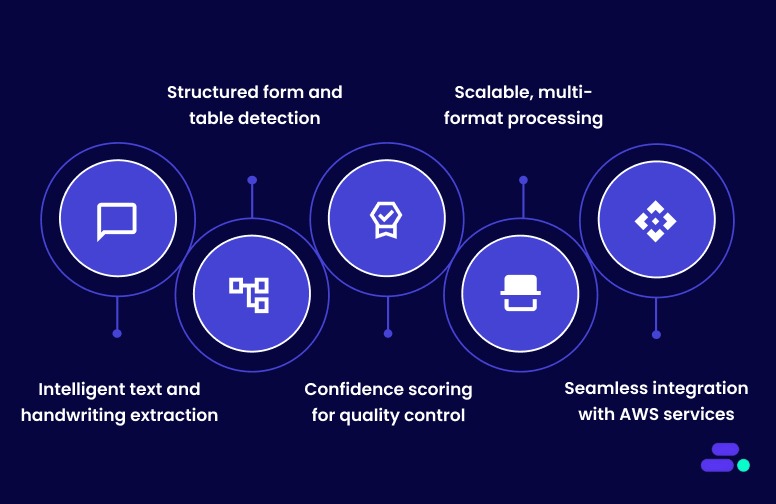
- Intelligent text and handwriting extraction: Amazon Textract accurately extracts both printed and handwritten text from scanned documents in multiple languages, ensuring no critical data is missed. It identifies text placement and layout context, making it effective for documents with complex formatting.
- Structured form and table detection: The service recognizes tables, fields, and key-value pairs such as “Invoice No: 1042” or “Patient Name: John Smith.” This preserves data relationships and outputs structured information for direct use in databases, ERP, or analytics platforms.
- Confidence scoring for quality control: Each extracted element is assigned a confidence score, allowing businesses to set validation thresholds. Combined with Amazon Augmented AI (A2I), Textract enables selective human review for high-stakes data, maintaining both speed and accuracy.
- Scalable, multi-format processing: Textract supports multiple file types (JPEG, PNG, PDF, TIFF) and can handle both single-page and multi-page documents. It scales automatically with AWS infrastructure, ideal for SMBs processing large document volumes without adding operational overhead.
- Seamless integration with AWS services: Textract works natively with Amazon S3, AWS Lambda, and AWS Glue to create end-to-end automated document workflows. This integration allows SMBs to streamline data extraction, transformation, and storage securely within the AWS ecosystem.
Amazon Textract enables SMBs to move from manual, error-prone data entry to fully automated, scalable document workflows. It empowers teams to extract, validate, and integrate data faster, improving accuracy, compliance, and overall productivity.
Suggested Read: Best practices for AWS resiliency: Building reliable clouds

Automating data extraction with Amazon Textract: An easy guide
Many SMBs are moving away from manual data entry toward automated document processing, and Amazon Textract is often at the center of that shift. By combining machine learning with intelligent document analysis, Textract helps businesses save time, reduce errors, and unlock data trapped in forms, invoices, and PDFs.
Pre-requisites of AWS Textract
Here are some prerequisites before starting:
- An AWS account with an IAM user or role that has AmazonTextractFullAccess (create a dedicated role for production).
- AWS CLI or SDK credentials configured (aws configure) or environment variables set.
- Install AWS SDK (Python example):
pip install boto3 - Documents in supported formats (JPEG, PNG, PDF, TIFF) and meeting quality guidelines (recommended ≥150 DPI, minimum text height ~15 px).
- For large or multi-page files, plan to use asynchronous APIs and store files in Amazon S3.
Here’s how businesses can easily implement Amazon Textract:
Step 1: Choose synchronous vs asynchronous processing
The first step is deciding how Amazon Textract will process documents, synchronously for quick, real-time extraction or asynchronously for handling large or multi-page files. This choice depends on workload size, latency needs, and document complexity.
- Synchronous (AnalyzeDocument): Best for single-page images or small PDFs (quick, real-time needs). File size limits apply (e.g., small images ≤ ~5 MB / single-page PDFs ≤ ~10 MB for sync).
- Asynchronous (StartDocumentAnalysis / StartDocumentTextDetection): Use for multi-page PDFs, large files, or batch processing. Requires the document to be placed in Amazon S3; results are retrieved via job IDs.
Rule of thumb: use sync for low-latency, single-page use cases; use async for bulk or multi-page jobs.
By selecting the right mode early, SMBs ensure efficient processing, with real-time insights for smaller documents or scalable batch automation for large volumes without performance bottlenecks.
Step 2: Prepare storage and permissions
Before running Amazon Textract, it’s essential to set up secure storage and access permissions. Documents and extracted data are stored in Amazon S3, while IAM roles define who can read, write, or manage them, ensuring a safe and compliant workflow.
- Create an S3 bucket to hold incoming documents and output (for async jobs).
- Ensure the Textract IAM role/user has read access to the S3 input bucket and write access if you store outputs.
- (Optional) Configure S3 lifecycle rules for long-term archiving (S3 Glacier) to control costs.
With properly configured S3 buckets and IAM permissions, SMBs create a secure, cost-efficient foundation for Textract operations, allowing smooth automation without data access issues or compliance risks.
Step 3: Basic API call (conceptual flow)
At this stage, businesses trigger Amazon Textract to extract data from documents using its APIs. Depending on the file type and processing mode, they can use synchronous calls for real-time results or asynchronous jobs for large or multi-page documents stored in Amazon S3.
Synchronous (single page):
- Read image bytes and call AnalyzeDocument with FeatureTypes set to ["TABLES", "FORMS"] or just text.
- Receive JSON Block objects containing PAGE, LINE, WORD, KEY_VALUE_SET, TABLE, CELL, etc.
- Parse JSON to extract text, key-value pairs, and table cells.
Asynchronous (multi-page / large files):
- Upload PDF/TIFF to S3.
- Call StartDocumentAnalysis (or StartDocumentTextDetection) specifying FeatureTypes = ["TABLES", "FORMS"].
- Poll GetDocumentAnalysis (or use SNS for notifications) until the job completes.
- Retrieve JSON Block objects, then parse and post-process.
By successfully executing the Textract API, SMBs gain structured JSON outputs containing detailed text, form fields, and table data, ready for transformation into usable formats such as CSV or databases for further automation.
Step 4: Interpreting Textract output
After running Amazon Textract, the service returns structured JSON output organized into “Block” objects that represent elements like text lines, tables, and form fields. Understanding these block relationships is key to reconstructing meaningful data, such as invoices, forms, and tables, accurately.
- Textract returns a list of Block objects. Common block types: PAGE, LINE, WORD, TABLE, CELL, KEY_VALUE_SET.
- Key-value pairs: link keys and values via relationships in the JSON; reconstruct programmatically to get InvoiceNumber → 12345.
- Tables: use TABLE + CELL blocks and their row/column relationships to rebuild CSV/Excel.
- Confidence scores: each block includes a confidence value; use thresholds to flag low-confidence items for review.
By parsing Textract’s output effectively, businesses can rebuild well-structured datasets (e.g., CSV or database entries) and apply confidence thresholds to flag uncertain results, ensuring data accuracy before it’s used for analytics or compliance reporting.
Step 5: Post-processing & storage
Once Textract completes extraction, the next step is post-processing—cleaning, validating, and storing the structured output. This involves normalizing data formats, applying business rules, and routing results to appropriate AWS storage or database services for long-term use and compliance retention.
- Convert extracted tables to CSV or JSON and store them in DynamoDB, RDS, or S3.
- Normalize fields (dates, currencies) and apply business rules (e.g., validate invoice numbers).
- Archive original documents and processed outputs for audit/compliance.
Example integrations: S3 (storage) → Lambda (event trigger) → Textract (analysis) → Lambda (parse & transform) → DynamoDB/Redshift (store).
Automated post-processing ensures that extracted data is accurate, searchable, and ready for downstream applications like analytics or billing. It also streamlines compliance by keeping both raw documents and processed results securely stored and easily auditable within the AWS ecosystem.
Step 6: Add quality control (human-in-the-loop)
Quality control ensures that extracted data meets accuracy and compliance standards. By leveraging confidence scores from Textract, SMBs can automatically process reliable data while flagging uncertain fields for human verification using Amazon A2I. This human-in-the-loop approach balances automation with accuracy.
- Use confidence thresholds to auto-accept high-confidence fields and route low-confidence items to human review.
- Integrate Amazon Augmented AI (A2I) to present small batches of low-confidence results to human reviewers and feed corrections back into workflows.
- Maintain audit logs of human edits for compliance.
Incorporating human review reduces errors, improves trust in automated workflows, and ensures regulatory compliance. SMBs can confidently process sensitive documents like invoices or medical forms while maintaining a clear audit trail of corrections and validations.
Step 7: Advanced options & ML augmentation
Advanced integration extends Textract beyond basic extraction. By combining it with Amazon Comprehend, SageMaker, or Step Functions, SMBs can perform entity recognition, sentiment analysis, domain-specific parsing, and orchestrate end-to-end automated workflows for more intelligent document processing.
- Combine Textract output with Amazon Comprehend for entity extraction, sentiment, or classification.
- Use Amazon SageMaker for custom models (e.g., specialized NLP or domain-specific table parsing) when Textract needs domain adaptation.
- Orchestrate workflows with Step Functions for long-running pipelines (upload → analyze → postprocess → human review → store).
These enhancements enable smarter, context-aware automation. SMBs can derive deeper insights, reduce manual intervention, and implement sophisticated, scalable document pipelines that adapt to specific business needs and complex data scenarios.
Following these steps lets SMBs automate document workflows end-to-end, extracting reliable data from invoices, forms, and records. It reduces manual effort, improves accuracy, and accelerates business processes while preserving auditability and compliance.

Common challenges when using Amazon Textract (and how to overcome them)
While Amazon Textract automates document data extraction, SMBs often encounter challenges related to document quality, format, parsing, scaling, and integration. Understanding these common issues and implementing practical solutions ensures smooth adoption, reliable results, and operational efficiency.
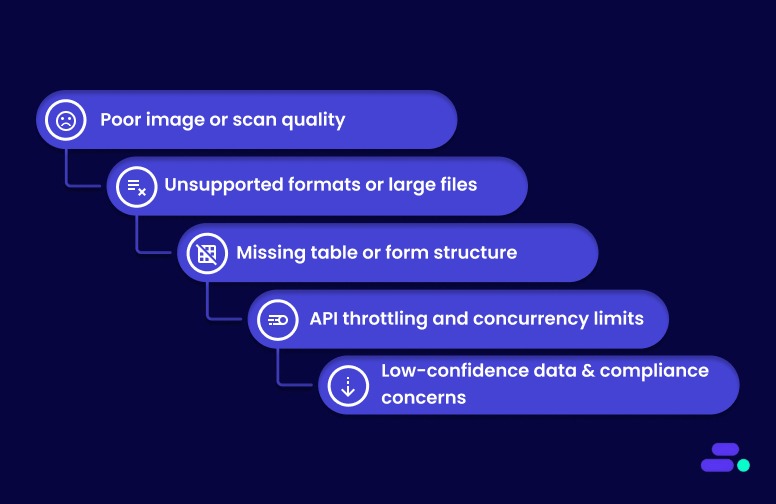
Here are some of the common challenges and their corresponding solutions:
1. Poor image or scan quality: Low-resolution, skewed, or low-contrast scans reduce extraction accuracy.
Solution: Preprocess documents with deskewing, denoising, and contrast enhancement. Enforce a minimum DPI of 150 for text clarity.
2. Unsupported formats or large files: XFA-based PDFs or very large multi-page documents may fail or require multiple retries.
Solution: Use asynchronous processing for large or multi-page files, and convert unsupported formats into standard PDFs or images (JPEG/PNG/TIFF).
3. Missing table or form structure: Tables and key-value relationships may not be detected correctly, affecting downstream workflows.
Solution: Verify parsing logic using the JSON Block relationships, and preprocess documents to improve layout clarity. Use async mode for complex, multi-page documents.
4. API throttling and concurrency limits: High-volume jobs can hit AWS API limits, causing delays or failures.
Solution: Implement batching, parallelism with SQS/Lambda, and exponential backoff for retries to stay within Textract service quotas.
5. Low-confidence data and compliance concerns
Challenge: Some extracted fields may be inaccurate, impacting business decisions or audits.
Solution: Apply confidence thresholds, route uncertain results through Amazon A2I for human validation, and maintain audit logs for compliance.
By proactively addressing these challenges, SMBs can maximize Textract’s accuracy, efficiency, and reliability. Proper preprocessing, intelligent workflow design, and human-in-the-loop validation ensure automated document extraction delivers real business value.
Also Read: AWS business continuity and disaster recovery plan

Troubleshooting and support for Amazon Textract
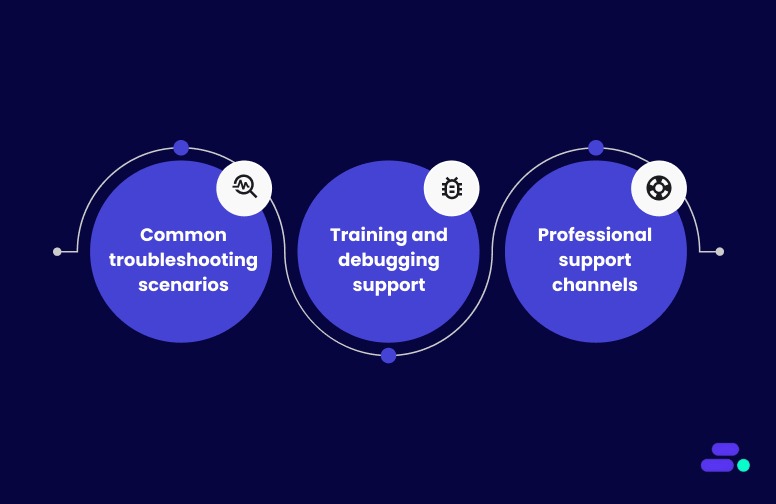
When challenges arise with Amazon Textract, a systematic approach to troubleshooting combined with access to AWS support resources can help resolve issues effectively.
1. Common troubleshooting scenarios
Businesses using Amazon Textract may encounter several recurring issues during implementation and daily operations. The most frequent challenges involve permissions, service limits, document quality, and integration with other AWS services. AWS provides detailed guidance and multiple support channels to help resolve these scenarios efficiently.
- IAM permission errors: Users often see "not authorized" errors when IAM policies are missing required permissions, such as textract:DetectDocumentText or textract:AnalyzeDocument. These issues are resolved by updating IAM policies to grant the necessary Amazon Textract actions.
- IAM: PassRole authorization failures: Errors related to IAM: PassRole occur when users lack permission to pass roles to Amazon Textract. Policies must be updated to allow the iam: PassRole action for relevant roles.
- S3 access issues: Insufficient permissions for S3 buckets, such as missing s3:GetObject, s3:ListBucket, or s3:GetBucketLocation, can prevent Amazon Textract from accessing documents. Ensure policies include these actions for the required buckets.
- Connection and throttling errors: Applications that exceed transaction per second (TPS) limits may encounter throttling or connection errors. AWS recommends implementing automatic retries with exponential backoff, typically up to five attempts, and requesting service quota increases as needed.
- Document quality and format problems: Amazon Textract performs best with high-contrast, clear documents in supported formats (JPEG, PNG, or text-based PDFs). If extraction fails or results are inaccurate, verify that documents are not image-based PDFs, are properly uploaded to S3, and meet quality guidelines.
2. Training and debugging support
Businesses using Amazon Textract have access to dedicated resources for troubleshooting and ongoing support. AWS provides both technical tools for debugging and multiple professional support channels to address operational or account-related issues.
- Validation files for custom queries: AWS generates validation files during training, helping users identify specific errors such as invalid manifest files, insufficient training documents, or cross-region Amazon S3 bucket issues.
- Detailed error descriptions: The system provides comprehensive error messages to pinpoint and resolve training dataset problems efficiently.
3. Professional support channels
Businesses using Amazon Textract have access to a range of professional support channels designed to address both technical and operational needs. These channels ensure users can resolve issues quickly, manage billing questions, and receive guidance on complex implementations.
- AWS Support Center: AWS offers multiple support channels for Amazon Textract users. For billing questions and account-related issues, users can contact the AWS Support Center.
- Technical assistance: For assistance with document accuracy issues, particularly with receipts, identification documents, or industrial diagrams, AWS provides direct email support through amazon-textract@amazon.com.
However, it is recommended to primarily use AWS Support Plans and AWS forums for technical assistance. - Enterprise and managed services: Organizations requiring enterprise-level support can access AWS Managed Services (AMS) for Amazon Textract provisioning and management. For custom pricing proposals and enterprise implementations, AWS provides dedicated sales consultation services through its partner contact forms.
Addressing common challenges lays the groundwork for a reliable deployment of Amazon Textract. Building on this foundation, following proven technical approaches and best practices helps maintain accuracy and performance over time.
Also Read: AWS business continuity and disaster recovery plan

For businesses seeking verified third-party consulting and implementation services, Cloudtech offers specialized Amazon Textract integration and optimization services to help maximize the document processing capabilities. Check out the pricing here!
Cloudtech's role in Amazon Textract implementation
Cloudtech, an AWS Advanced Tier Partner, specializes in cloud modernization and intelligent document processing for small and medium businesses. We deliver customized solutions to automate, optimize, and scale AWS environments, with a focus on document-centric workflows.
Cloudtech builds tailored workflows using Amazon Textract, helping businesses reduce manual effort, improve data accuracy, and speed up document processing.
- Data and application modernization: Upgrading data infrastructure and transforming legacy applications into scalable, cloud-native solutions.
- AWS cloud strategy and optimization: Delivering end-to-end AWS services, including cloud assessments, architecture design, and cost optimization.
- AI and automation: Implementing generative AI and intelligent automation to streamline business processes and boost efficiency.
- Infrastructure and resiliency: Building secure, high-availability cloud environments to support business continuity and regulatory compliance.
By combining automation, best practices, and deep AWS expertise, Cloudtech helps SMBs not just “move to the cloud,” but operate like cloud-native businesses, with infrastructure that’s secure, efficient, and ready to evolve with market demands.
See how other SMBs have modernized, scaled, and thrived with Cloudtech’s support →

Conclusion
Amazon Textract moves beyond traditional OCR by capturing not only text but also the structure and context within documents, enabling more accurate and actionable data extraction.
Understanding its capabilities and practical applications equips businesses to rethink document workflows and reduce the burden of manual processing. Whether handling forms, tables, or handwritten notes, Amazon Textract offers a reliable option to streamline operations and improve data accuracy.
For organizations seeking to implement or expand their use of this technology, Cloudtech offers expert guidance and support to ensure a smooth and effective deployment customized to business needs.
Reach out to Cloudtech to explore how Amazon Textract can be integrated into a business's cloud strategy.
FAQs
1. How does Amazon Textract's Custom Queries adapter auto-update feature work?
The auto-update feature automatically updates businesses' Custom Queries adapter whenever improvements are made to the pretrained Queries feature. This ensures their custom models are always up-to-date without manual intervention. Businesses can toggle this feature on or off during adapter creation, or update it later via the update_adapter API call.
2. What are the specific training requirements and limitations for Custom Queries adapters?
To create Custom Queries adapters, businesses must upload at least five training documents and five test documents. Businesses can upload a maximum of 2,500 training documents and 1,000 test documents. The training process involves annotating documents with queries and responses. Monthly training limits apply, and they can view these limits in the Service Quotas console.
3. How does Amazon Textract handle data retention, and what are the deletion policies?
Amazon Textract stores processed content only to provide and improve the service. Content is encrypted and stored in the AWS region where the service is used. They can request deletion of content through AWS Support, though it may affect the service's performance. Training content for Custom Queries adapters is deleted after training is complete.
4. What is the Amazon Textract Service Quota Calculator, and how does it help with capacity planning?
The Service Quota Calculator helps businesses estimate their quota requirements based on their workload, including the number of documents and pages. It provides recommended quota values and links to the Service Quotas console for increased requests, helping businesses plan their capacity more effectively.
5. How does Amazon Textract's VPC endpoint configuration work with AWS PrivateLink?
Amazon Textract supports private connectivity using interface VPC endpoints powered by AWS PrivateLink, ensuring secure communication without the public internet. Businesses can create VPC endpoints for standard or FIPS-compliant operations and apply endpoint policies to control access within their VPC environment.


A busy physician on morning rounds, speaking into their phone for just 30-45 seconds about a patient's condition. By the time they move to the next room, a complete progress note is ready for their EMR, detailed and written in their own style. No hours spent on documentation after shift. No administrative burden cutting into patient care time.
This is now a reality.
In August 2025, Pieces Technologies launched "Pieces in your Pocket," an AI-powered assistant that's reducing documentation time for inpatient physicians by 50%. The tool doesn't simply transcribe words, but understands context, learns from prior notes, and adapts to each physician's documentation style to generate clinical-quality records from brief voice interactions.
This innovation represents a broader shift happening across healthcare, driven by Conversational AI. Virtual assistants and voice agents are increasingly taking on essential roles, from clinical documentation and decision support to patient follow-ups and care coordination, fundamentally changing how healthcare is delivered.
This guide explores how Conversational AI is transforming healthcare, the technologies powering this change, and the real-world benefits for patients, providers, and healthcare organizations.
Quick Glance
- Conversational AI in healthcare refers to AI systems that enable human-like interactions between patients and healthcare providers, improving engagement and operational efficiency.
- Key use cases include 24/7 patient support, symptom triage, appointment scheduling, medication management, and remote patient monitoring.
- Challenges in implementing Conversational AI include ensuring data privacy and security, integration with existing systems, and maintaining high response accuracy.
- Cloudtech offers tailored Conversational AI solutions for healthcare, helping providers implement AI-driven tools that streamline operations and improve patient care.
- The future of Conversational AI in healthcare includes proactive health monitoring, personalized medicine, enhanced virtual assistants, and seamless integration with EHRs.
What is Conversational AI in healthcare?
Conversational AI in healthcare refers to the use of AI technologies to facilitate human-like interactions between patients and healthcare systems.
It can understand and respond to both text and voice inputs using tools like Natural Language Processing (NLP), speech recognition, and machine learning. This makes it a crucial technology for automating a wide range of healthcare processes, reducing human workload, and providing patients with personalized, 24/7 assistance.
In essence, Conversational AI helps healthcare providers offer interactive, efficient, and scalable services without human intervention. It enhances the overall patient experience by providing quick, accurate answers to common queries and streamlining a variety of operational tasks. Whether it's helping patients schedule appointments, manage medications, or get immediate health advice, Conversational AI is transforming how healthcare systems interact with both patients and providers.
Now that we have a clear understanding of what Conversational AI entails, let’s check out a few use cases that reveal the massive potential of this technology.
Key use cases of Conversational AI in healthcare
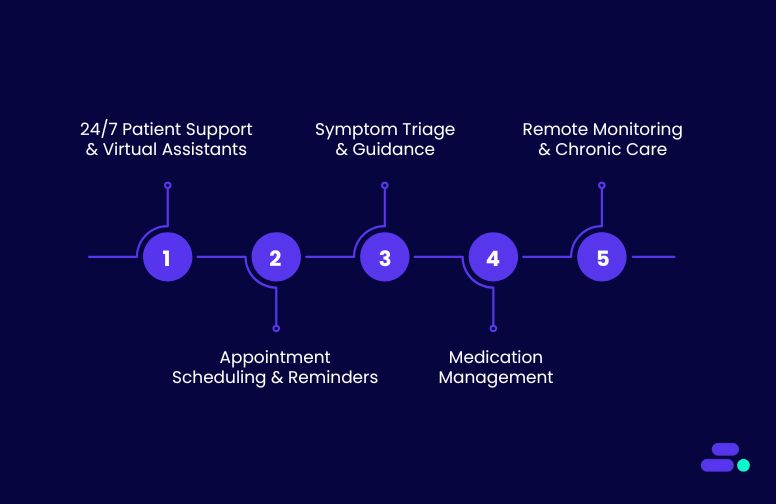
Conversational AI is making a profound impact across the healthcare sector, addressing various challenges by improving patient engagement, streamlining processes, and enhancing decision-making. Below are some key use cases where Conversational AI is being applied effectively:
1. 24/7 patient support and virtual assistants
AI-powered virtual assistants offer patients real-time, on-demand responses to common queries, such as symptoms, medication information, and appointment scheduling. These assistants work around the clock, providing patients with immediate access to vital information, improving overall satisfaction of the patients.
- Benefits:
- Round-the-clock availability.
- Instant access to healthcare information.
- Reduced workload for administrative staff.
2. Appointment scheduling and reminders
Scheduling appointments in a healthcare setting can be cumbersome and time-consuming for both patients and providers. Conversational AI simplifies this process by allowing patients to book, reschedule, and cancel appointments. It is as simple as having a conversation with a personal assistant. Additionally, the AI system can send reminders and follow-up notifications to reduce no-shows and ensure that appointments run on time.
- Benefits:
- Improved appointment booking efficiency.
- Reduced no-show rates.
- Automated reminders and follow-ups.
3. Symptom triage and guidance
Conversational AI can assist with symptom triage, guiding patients through a series of questions to assess their symptoms. It can also determine whether the patients need immediate medical attention or a visit to the doctor. By analyzing the responses, AI-powered systems can provide initial guidance, such as suggesting over-the-counter treatments, booking a doctor’s appointment, or advising the patient to seek urgent care.
- Benefits:
- Faster symptom assessment.
- Reduces unnecessary visits to the hospital or clinic.
- Enhances early detection and intervention.
4. Medication management
AI-powered systems help manage patients' medication schedules by reminding them when to take their medication, offering dosage information, and tracking adherence. These systems can also alert patients about potential side effects and offer guidance on medication management.
- Benefits:
- Improved medication adherence.
- Reduces the risk of medication errors.
- Personalized reminders and alerts.
5. Remote patient monitoring and chronic care management
For patients with chronic conditions, ongoing monitoring is essential. Conversational AI, integrated with remote monitoring tools, can keep track of patients’ health data, such as blood pressure, glucose levels, or heart rate, and send real-time updates to both patients and healthcare providers. This proactive approach to care ensures timely interventions and reduces hospital readmissions.
- Benefits:
- Continuous monitoring of chronic conditions.
- Early detection of potential issues.
- Better management of long-term health conditions.
Want to give your patients interactions that feel human, not robotic, while saving your team hours? Discover Cloudtech’s AI Voice Calling today.
Now, Let’s take a closer look at some real-world examples where Conversational AI has already made a significant impact, and see how it continues to shape the future of healthcare delivery.
Real-world applications of Conversational AI in healthcare
The integration of Conversational AI in healthcare has led to transformative outcomes, as evidenced by various case studies and industry analyses.
For example, when the COVID-19 pandemic accelerated the adoption of digital health solutions, 72.5% of patients utilized front-end conversational AI voice agents or symptom checkers during virtual visits. This led to an increase in AI-driven patient engagement platforms in modern healthcare delivery.
Here is another example:
To enhance patient engagement and streamline administrative tasks, a prominent healthcare provider implemented an AI-driven voice agent system. This system was designed to handle a variety of patient interactions, including appointment scheduling, medication reminders, and general inquiries.
The AI voice agent utilizes advanced Natural Language Processing (NLP) and Machine Learning (ML) algorithms to understand and respond to patient queries in real-time. Integrated with the healthcare provider's Electronic Health Record (EHR) system, the voice agent can access patient information to provide personalized responses and schedule appointments accordingly.
Additionally, the system is capable of sending automated reminders for upcoming appointments and medication refills, thereby improving patient adherence to treatment plans. The voice agent also assists in triaging patient inquiries, directing them to the appropriate department or healthcare professional when necessary.
Results and Benefits
- Improved Patient Access: The AI voice agent operates 24/7, allowing patients to access information and services at their convenience, reducing wait times and enhancing satisfaction.
- Operational Efficiency: By automating routine tasks, the healthcare provider has freed up staff to focus on more complex patient needs, leading to improved workflow efficiency.
- Enhanced Patient Adherence: Automated reminders have contributed to better patient adherence to appointments and medication regimens, potentially leading to improved health outcomes.
- Cost Savings: The implementation of the AI voice agent has resulted in cost savings by reducing the need for additional administrative staff and minimizing scheduling errors.
While the integration of voice AI in healthcare presents numerous advantages, challenges such as ensuring data privacy, maintaining system accuracy, and achieving seamless integration with existing EHR systems remain. Addressing these challenges is crucial for the successful adoption and sustained impact of AI voice agents in healthcare settings.
Challenges and considerations for implementing Conversational AI in healthcare
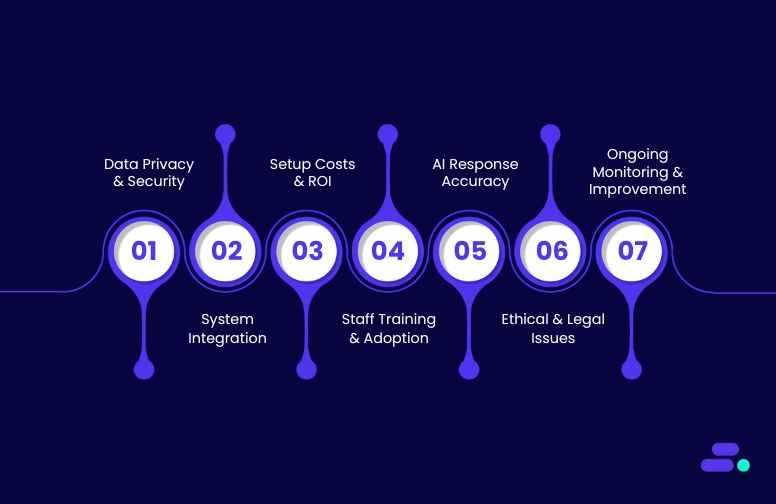
While the advantages of Conversational AI in healthcare are significant, the implementation of such technology comes with its own set of challenges and considerations. Healthcare organizations must carefully assess these challenges to ensure a smooth and successful integration of Conversational AI into their operations. Below are some key challenges and factors that healthcare providers need to keep in mind when adopting Conversational AI solutions:
1. Data privacy and security concerns
The sensitive nature of healthcare data demands data privacy and security when implementing Conversational AI systems. Patient information is protected by strict regulations such as HIPAA (Health Insurance Portability and Accountability Act) in the U.S., and non-compliance can lead to severe consequences.
AI systems must adhere to these regulatory standards to safeguard patient data and maintain confidentiality. Additionally, AI-powered tools that process health data need robust encryption protocols, secure access controls, and frequent audits to prevent unauthorized access.
Considerations:
- Work with trusted vendors that provide compliant AI systems.
- Ensure data encryption, role-based access control, and regular security audits.
- Design AI systems with built-in privacy by design to mitigate risks.
2. Integration with existing healthcare systems
Integrating Conversational AI with existing healthcare IT systems, such as EHRs (Electronic Health Records), EMRs (Electronic Medical Records), practice management systems, and other clinical applications, can be a complex process. A lack of seamless integration could lead to workflow disruptions, inefficiencies, and system conflicts. For instance, a virtual assistant may struggle to pull up patient data from an outdated system or fail to update records in real-time, causing discrepancies in patient information.
Considerations:
- Choose AI solutions that offer robust API integrations with existing systems.
- Ensure smooth data synchronization between Conversational AI and backend systems.
- Collaborate with IT teams to ensure proper configuration and testing before deployment.
3. High Initial Setup Costs and ROI Concerns
The initial investment in Conversational AI technology can be substantial, especially when considering development costs, system integration, and customization for specific healthcare needs. While AI systems can ultimately lead to cost savings through automation and operational efficiency, the return on investment (ROI) may take time to materialize. Healthcare organizations must assess whether they have the budget for such a project and whether the potential benefits justify the upfront costs.
Considerations:
- Perform a cost-benefit analysis to understand potential savings and improvements in patient care.
- Start with pilot projects to test AI capabilities before full-scale deployment.
- Look for AI solutions with scalable pricing models to reduce initial costs.
4. Training and Adoption by Healthcare Staff
For Conversational AI to function optimally, healthcare providers need to ensure their staff are properly trained to work alongside the new system. This includes training on how to interact with AI tools, how to escalate complex cases to human agents, and how to leverage AI to enhance patient care. Resistance from staff or lack of training can lead to underutilization of the technology and hinder its effectiveness.
Considerations:
- Invest in comprehensive training for healthcare professionals and administrative staff.
- Highlight the benefits of AI such as reduced workloads and improved patient outcomes to encourage adoption.
- Implement feedback mechanisms to gather input from staff on AI performance and usability.
5. Ensuring Accuracy and Quality of AI Responses
While Conversational AI can handle many types of queries, it is still an evolving technology, and AI systems are not infallible. The accuracy of responses is critical, especially in healthcare, where providing incorrect information can lead to adverse outcomes.
Considerations:
- Use AI systems that are regularly updated and trained on the latest medical knowledge and terminology.
- Implement human oversight to review AI responses, especially in critical healthcare situations.
- Use machine learning algorithms to refine AI understanding based on real-world data and patient feedback.
6. Ethical and Legal Concerns
The implementation of Conversational AI in healthcare raises several ethical and legal concerns, especially around patient privacy, consent, and accountability. For example, if an AI system provides incorrect advice that leads to harm, who is liable—the healthcare provider, the AI vendor, or the system itself? Addressing these questions is essential to avoid potential legal complications and ensure that AI tools are being used responsibly and ethically.
Considerations:
- Establish clear guidelines around the use of AI in patient care, ensuring that human oversight is maintained in critical cases.
- Connect with legal teams to ensure compliance with healthcare regulations (e.g., HIPAA).
- Adopt transparent AI policies that respect patient privacy and consent.
7. Continuous Monitoring and Improvement
Conversational AI is not a “set it and forget it” solution. It requires continuous monitoring and fine-tuning to ensure it evolves with changing patient needs, healthcare regulations, and medical advances. Regular updates and retraining are essential to ensure that the system remains effective, efficient, and accurate over time.
Considerations:
- Set up a dedicated team to monitor AI performance and handle updates.
- Establish metrics for AI performance to track improvements and address any deficiencies.
- Schedule regular audits of the AI system to ensure compliance with healthcare standards.
Want to overcome the challenges of Conversational AI implementation in healthcare? Connect with Cloudtech today to explore tailored solutions that address these challenges and unlock the potential of AI-powered patient engagement.
As we look ahead, the future of Conversational AI in healthcare holds immense promise.
The future of Conversational AI in healthcare
Conversational AI in healthcare is filled with possibilities that can revolutionize patient care and improve operational efficiency. As AI continues to advance, its role in healthcare will only grow, bringing even more sophisticated solutions to address the evolving needs of patients and providers alike.
Here’s a look at the key trends and emerging examples that will shape the future of Conversational AI in healthcare:
1. Proactive health monitoring and preventive care
One of the most exciting advancements in Conversational AI is the potential for proactive health monitoring. In the future, AI systems will not just respond to patient queries but will take a proactive role in predicting health issues before they arise. By integrating AI with wearable devices, sensors, and health apps, Conversational AI can offer real-time health monitoring, flagging potential issues based on a patient’s vitals or behavior patterns.
Example: AI-powered systems, integrated with wearables like fitness trackers or smartwatches, could monitor vital signs such as heart rate, blood pressure, or blood sugar levels. If the system detects abnormal readings, it could send notifications to the patient or even alert healthcare providers to take preventative action. For instance, an AI assistant could remind a diabetic patient to adjust their insulin levels based on real-time glucose measurements.
Impact: This proactive approach can help in the early detection of chronic conditions, preventing complications and improving patient outcomes.
2. AI-driven personalized medicine
As personalized medicine gains more prominence, Conversational AI will play a significant role in delivering individualized care. By leveraging genetic data, patient history, and real-time health data, AI systems will provide tailored treatment plans that consider each patient's unique health profile.
Example: Imagine an AI assistant integrated into a cancer care center’s workflow. The system could analyze a patient’s genomic data along with previous treatment responses to recommend personalized cancer treatments. It could suggest specific medications or therapy regimens that have shown the highest likelihood of success based on the patient’s unique genetic makeup and past medical history.
Impact: Personalized treatment plans that factor in the specific biology of the patient can increase the effectiveness of treatments and reduce the risk of adverse reactions, offering more precise care for complex health conditions.
3. Enhanced virtual health assistants and voice agents
In the near future, virtual health assistants powered by Conversational AI will be able to conduct more sophisticated medical conversations. These assistants will go beyond basic symptom triage or appointment scheduling and will evolve to provide continuous, holistic health guidance across multiple touchpoints.
Example: AI health assistants could monitor patients' symptoms over time, keeping track of ongoing concerns and making suggestions based on the patient’s evolving condition. For example, an AI-powered assistant for managing mental health might ask about a user’s mood, suggest coping strategies, and recommend professional therapy sessions if necessary.
Impact: Such systems will not only make healthcare more accessible and convenient but also reduce the burden on medical staff by automating routine interactions. This allows providers to focus on more difficult patient care tasks.
4. AI in remote care and telemedicine
As telemedicine becomes more widely adopted, Conversational AI will play a crucial role in facilitating patient interactions and ensuring that consultations are efficient and comprehensive. AI assistants will enable remote consultations, help with administrative tasks, and provide immediate responses to basic health concerns, improving the efficiency of virtual healthcare delivery.
Example: In a telemedicine consultation, an AI assistant could handle pre-consultation processes, such as collecting patient history, validating insurance information, and analyzing symptoms. During the consultation, AI can assist healthcare providers by suggesting potential diagnoses based on the patient’s input and medical records, making the consultation process faster and more accurate.
Impact: Telemedicine platforms that integrate Conversational AI will offer seamless, 24/7 virtual care and improve access to healthcare in underserved areas.
5. Multilingual support for global healthcare access
As healthcare becomes more globalized, multilingual support powered by Conversational AI will be essential to ensuring that patients from different linguistic backgrounds can access healthcare services without barriers.
Example: A global health network could deploy AI-powered systems that can speak multiple languages. For instance, a patient from Spain could interact with an AI assistant in Spanish to book an appointment with an English-speaking doctor. The AI could seamlessly translate between the patient and the healthcare provider, ensuring there are no communication barriers.
Impact: This will greatly improve the accessibility of healthcare services for non-English-speaking populations, ensuring equitable access to care worldwide.
6. Seamless integration with EHRs and other healthcare systems
In the future, Conversational AI will be able to seamlessly integrate with Electronic Health Records (EHRs), practice management systems, and healthcare workflows. This integration will ensure that patient data flows smoothly between the AI system and the healthcare provider’s backend systems, enabling better coordination of care.
Example: A patient reaches out to an AI assistant for a prescription refill. The assistant can pull up the patient’s EHR, confirm the current medication, and even notify the healthcare provider of the refill request. The AI can automatically request approval from the doctor’s office and send the prescription to the pharmacy, all without human intervention.
Impact: This will streamline administrative workflows and ensure data consistency across systems, enabling healthcare providers to offer more coordinated and effective care.
7. AI for healthcare fraud detection and compliance
With growing concerns over fraud and compliance in healthcare, Conversational AI will become an important tool for identifying suspicious activities and ensuring adherence to regulatory standards. AI-powered systems can flag unusual billing patterns, monitor claims for discrepancies, and ensure that providers follow compliance guidelines.
Example: An AI system could monitor insurance claims and detect discrepancies in real-time, alerting healthcare organizations about potential fraud. It can also help with HIPAA compliance by ensuring that patient data is handled securely during AI interactions, preventing unauthorized access or misuse.
Impact: Conversational AI will enhance fraud prevention and streamline compliance processes, helping healthcare organizations reduce risk and protect patient data.
8. AI-Powered medical research assistance
AI-driven systems can assist researchers in data mining, reviewing literature, and identifying potential clinical trials that match patient profiles.
Example: An AI assistant could help oncologists by quickly reviewing the latest cancer research and suggesting new treatment options based on recent breakthroughs. It could also match patients with ongoing clinical trials based on their medical history and eligibility criteria.
Impact: Conversational AI will accelerate research efforts, improve the accuracy of findings, and ensure that the most up-to-date medical knowledge is readily available to healthcare professionals.
Conclusion
The healthcare industry is at the cusp of a major transformation, and Conversational AI is leading the charge. By enabling smarter, more efficient interactions, it not only enhances patient engagement but also streamlines administrative workflows, helping healthcare providers focus more on patient care. Whether it’s assisting patients with appointment scheduling, providing medication reminders, or offering 24/7 support, Conversational AI is proving to be a game-changer.
Cloudtech is committed to helping healthcare providers integrate Conversational AI solutions that enhance patient care, improve operational efficiency, and ensure compliance with industry standards. With deep expertise in AI and healthcare systems, Cloudtech offers tailored solutions that help your organization unlock the full potential of Conversational AI.
Ready to elevate your healthcare experience with Conversational AI?
Connect with Cloudtech and start building the future of customer experience.
Frequently Asked Questions (FAQs)
1. What is Conversational AI in healthcare?
Conversational AI in healthcare refers to the use of AI technologies to facilitate human-like interactions between patients and healthcare systems, enabling tasks such as appointment scheduling, medication reminders, and symptom triage.
2. How can Conversational AI improve patient care?
By providing instant, personalized responses, Conversational AI enhances patient engagement, ensures timely information delivery, and supports better health outcomes.
3. Is Conversational AI secure for handling patient data?
Yes, when implemented with proper security measures and compliance with regulations like HIPAA, Conversational AI can securely handle patient data.
4. Can Conversational AI integrate with existing healthcare systems?
Absolutely. Conversational AI solutions can be integrated with healthcare systems like Electronic Health Records (EHR) to streamline workflows and improve efficiency.
The global datasphere will balloon to 175 zettabytes in 2025, and nearly 80% of that data will go cold within months of creation. That’s not just a technical challenge for businesses. It’s a financial and strategic one.
For small and medium-sized businesses (SMBs), the question is: how to retain vital information like compliance records, backups, and historical logs without bleeding budget on high-cost active storage?
This is where Amazon S3 Glacier comes in. With its ultra-low costs, high durability, and flexible retrieval tiers, the purpose-built archival storage solution lets you take control of long-term data retention without compromising on compliance or accessibility.
This guide breaks down what S3 Glacier is, how it works, when to use it, and how businesses can use it to build scalable, cost-efficient data strategies that won’t buckle under tomorrow’s zettabytes.
Key takeaways:
- Purpose-built for archival storage: Amazon S3 Glacier classes are designed to reduce costs for infrequently accessed data while maintaining durability.
- Three storage class options: Instant retrieval, flexible retrieval, and deep archive support varying recovery speeds and pricing tiers.
- Lifecycle policy automation: Amazon S3 lifecycle rules automate transitions between storage classes, optimizing cost without manual oversight.
- Flexible configuration and integration: Amazon S3 Glacier integrates with existing Amazon S3 buckets, IAM policies, and analytics tools like Amazon Redshift Spectrum and AWS Glue.
- Proven benefits across industries: Use cases from healthcare, media, and research confirm Glacier’s role in long-term data retention strategies.
What is Amazon S3 Glacier storage, and why do SMBs need it?
Amazon Simple Storage Service (Amazon S3) Glacier is an archival storage class offered by AWS, designed for long-term data retention at a low cost. It’s intended for data that isn’t accessed frequently but must be stored securely and durably, such as historical records, backup files, and compliance-related documents.
Unlike Amazon S3 Standard, which is built for real-time data access, Glacier trades off speed for savings. Retrieval times vary depending on the storage class used, allowing businesses to optimize costs based on how soon or how often they need to access that data.
Why it matters for SMBs: For small and mid-sized businesses modernizing with AWS, Amazon S3 Glacier helps manage growing volumes of cold data without escalating costs. Key reasons for implementing the solution include:

- Cost-effective for inactive data: Pay significantly less per GB compared to other Amazon S3 storage classes, ideal for backup or archive data that is rarely retrieved.
- Built-in lifecycle policies: Automatically move data from Amazon S3 Standard or Amazon S3 Intelligent-Tiering to Amazon Glacier or Glacier Deep Archive based on rules with no manual intervention required.
- Seamless integration with AWS tools: Continue using familiar AWS APIs, Identity and Access Management (IAM), and Amazon S3 bucket configurations with no new learning curve.
- Durable and secure: Data is redundantly stored across multiple AWS Availability Zones, with built-in encryption options and compliance certifications.
- Useful for regulated industries like healthcare: Healthcare SMBs can use Amazon Glacier to store medical imaging files, long-term audit logs, and compliance archives without overcommitting to active storage costs.
Amazon S3 Glacier gives SMBs a scalable way to manage historical data while aligning with cost-control and compliance requirements.
How can SMBs choose the right Amazon S3 Glacier class for their data?

The Amazon S3 Glacier storage classes are purpose-built for long-term data retention, but not all archived data has the same access or cost requirements. AWS offers three Glacier classes, each designed for a different balance of retrieval time and storage pricing.
For SMBs, choosing the right Glacier class depends on how often archived data is accessed, how quickly it needs to be retrieved, and the overall storage budget.
1. Amazon S3 Glacier Instant Retrieval
Amazon S3 Glacier Instant Retrieval is designed for rarely accessed data that still needs to be available within milliseconds. It provides low-cost storage with fast retrieval, making it suitable for SMBs that occasionally need immediate access to archived content.
Specifications:
- Retrieval time: Milliseconds
- Storage cost: ~$0.004/GB/month
- Minimum storage duration: 90 days
- Availability SLA: 99.9%
- Durability: 99.999999999%
- Encryption: Supports SSE-S3 and SSE-KMS
- Retrieval model: Immediate access with no additional tiering
When it’s used: This class suits SMBs managing audit logs, patient records, or legal documents that are accessed infrequently but must be available without delay. Healthcare providers, for instance, use this class to store medical imaging (CT, MRI scans) for emergency retrieval during patient consultations.
2. Amazon S3 Glacier Flexible Retrieval
Amazon S3 Glacier Flexible Retrieval is designed for data that is infrequently accessed and can tolerate retrieval times ranging from minutes to hours. It offers multiple retrieval options to help SMBs manage both performance and cost, including a no-cost bulk retrieval option.
Specifications:
- Storage cost: ~$0.0036/GB/month
- Minimum storage duration: 90 days
- Availability SLA: 99.9%
- Durability: 99.999999999%
- Encryption: Supports SSE-S3 and SSE-KMS
- Retrieval tiers:
- Expedited: 1–5 minutes ($0.03/GB)
- Standard: 3–5 hours ($0.01/GB)
- Bulk: 5–12 hours (free per GB)
- Provisioned capacity (optional): $100 per unit/month
When it’s used: SMBs performing planned data restores, like IT service providers handling monthly backups, or financial teams accessing quarterly records, can benefit from this class. It's also suitable for healthcare organizations restoring archived claims data or historical lab results during audits.
3. Amazon S3 Glacier Deep Archive
Amazon S3 Glacier Deep Archive is AWS’s lowest-cost storage class, optimized for data that is accessed very rarely, typically once or twice per year. It’s designed for long-term archival needs where retrieval times of up to 48 hours are acceptable.
Specifications:
- Storage cost: ~$0.00099/GB/month
- Minimum storage duration: 180 days
- Availability SLA: 99.9%
- Durability: 99.999999999%
- Encryption: Supports SSE-S3 and SSE-KMS
- Retrieval model:
- Standard: ~12 hours ($0.0025/GB)
- Bulk: ~48 hours ($0.0025/GB)
When it’s used: This class is ideal for SMBs with strict compliance or regulatory needs but no urgency in data retrieval. Legal firms archiving case files, research clinics storing historical trial data, or any business maintaining long-term tax records can use Deep Archive to minimize ongoing storage costs.
By selecting the right Glacier storage class, SMBs can control storage spending without sacrificing compliance or operational needs.

How to successfully set up and manage Amazon S3 Glacier storage?

Setting up Amazon S3 Glacier storage classes requires careful planning of bucket configurations, lifecycle policies, and access management strategies. Organizations must consider data classification requirements, access patterns, and compliance obligations when designing Amazon S3 Glacier storage implementations.
The management approach differs significantly from standard Amazon S3 storage due to retrieval requirements and cost optimization considerations. Proper configuration ensures optimal performance while minimizing unexpected costs.
Step 1: Creating and configuring Amazon S3 buckets
S3 bucket configuration for Amazon S3 Glacier storage classes requires careful consideration of regional placement, access controls, and lifecycle policy implementation. Critical configuration parameters include:
- Regional selection: Choose regions based on data sovereignty requirements, disaster recovery strategies, and network latency considerations for retrieval operations
- Access control policies: Implement IAM policies that restrict retrieval operations to authorized users and prevent unauthorized cost generation
- Versioning strategy: Configure versioning policies that align with minimum storage duration requirements (90 days for Instant/Flexible, 180 days for Deep Archive)
- Encryption settings: Enable AES-256 or AWS KMS encryption for compliance with data protection requirements
Bucket policy configuration must account for the restricted access patterns associated with Amazon S3 Glacier storage classes. Standard S3 permissions apply, but organizations should implement additional controls for retrieval operations and related costs.
Step 2: Uploading and managing data in Amazon S3 Glacier storage classes

Direct uploads to Amazon S3 Glacier storage classes utilize standard S3 PUT operations with appropriate storage class specifications. Key operational considerations include:
- Object size optimization: AWS applies default behavior, preventing objects smaller than 128 KB from transitioning to avoid cost-ineffective scenarios
- Multipart upload strategy: Large objects benefit from multipart uploads, with each part subject to minimum storage duration requirements
- Metadata management: Implement comprehensive tagging strategies for efficient object identification and retrieval planning
- Aggregation strategies: Consider combining small files to optimize storage costs, where minimum duration charges may exceed data storage costs
Large-scale migrations often benefit from AWS DataSync or AWS Storage Gateway implementations that optimize transfer operations. Organizations should evaluate transfer acceleration options for geographically distributed data sources.
Step 3: Restoring objects and managing retrieval settings
Object restoration from Amazon S3 Glacier storage classes requires explicit restoration requests that specify retrieval tiers and duration parameters. Critical operational parameters include:
- Retrieval tier selection: Choose appropriate tiers based on urgency requirements and cost constraints
- Duration specification: Set restoration duration (1-365 days) to match downstream processing requirements
- Batch coordination: Plan bulk restoration operations to avoid overwhelming downstream systems
- Cost monitoring: Track retrieval costs across different tiers and adjust strategies accordingly
Restored objects remain accessible for the specified duration before returning to the archived state. Organizations should coordinate restoration timing with downstream processing requirements to avoid re-restoration costs.

How to optimize storage with Amazon S3 Glacier lifecycle policies?
Moving beyond basic Amazon S3 Glacier implementation, organizations can achieve significant cost optimization through the strategic configuration of S3 lifecycle policies. These policies automate data transitions across storage classes, eliminating the need for manual intervention while ensuring cost-effective data management throughout object lifecycles.
Lifecycle policies provide teams with precise control over how data is moved across storage classes, helping to reduce costs without sacrificing retention goals. For Amazon S3 Glacier, getting the configuration right is crucial; even minor missteps can result in higher retrieval charges or premature transitions that impact access timelines.
Translating strategy into measurable savings starts with how those lifecycle rules are configured.
1. Lifecycle policy configuration fundamentals

Amazon S3 lifecycle policies automate object transitions through rule-based configurations that specify transition timelines and target storage classes. Organizations can implement multiple rules within a single policy, each targeting specific object prefixes or tags for granular control and management.
Critical configuration parameters include:
- Transition timing: Objects in Standard-IA storage class must remain for a minimum of 30 days before transitioning to Amazon S3 Glacier
- Object size filtering: Amazon S3 applies default behavior, preventing objects smaller than 128 KB from transitioning to avoid cost-ineffective scenarios
- Storage class progression: Design logical progression paths that optimize costs while maintaining operational requirements
- Expiration rules: Configure automatic deletion policies for objects reaching end-of-life criteria
2. Strategic transition timing optimization
Effective lifecycle policies require careful analysis of data access patterns and cost structures across storage classes. Two-step transitioning approaches (Standard → Standard-IA → Amazon S3 Glacier) often provide cost advantages over direct transitions.
Optimal transition strategies typically follow these patterns:
- Day 0-30: Maintain objects in the Standard storage class for frequent access requirements
- Day 30-90: Transition to Standard-IA for reduced storage costs with immediate access capabilities
- Day 90+: Implement Amazon S3 Glacier transitions based on access frequency requirements and cost optimization goals
- Day 365+: Consider Deep Archive transition for long-term archival scenarios
3. Policy monitoring and cost optimization
Billing changes occur immediately when lifecycle configuration rules are satisfied, even before physical transitions complete. Organizations must implement monitoring strategies that track the effectiveness of policies and their associated costs.
Key monitoring metrics include:
- Transition success rates: Monitor successful transitions versus failed attempts
- Cost impact analysis: Track storage cost reductions achieved through lifecycle policies
- Access pattern validation: Verify that transition timing aligns with actual data access requirements
- Policy rule effectiveness: Evaluate individual rule performance and adjust configurations accordingly
What type of businesses benefit the most from Amazon S3 Glacier?
Amazon S3 Glacier storage classes are widely used to support archival workloads where cost efficiency, durability, and compliance are key priorities. Each class caters to distinct access patterns and technical requirements.
The following use cases, drawn from AWS documentation and customer case studies, illustrate practical applications of these classes across different data management scenarios.
1. Media asset archival (Amazon S3 Glacier Instant Retrieval)
Amazon S3 Glacier Instant Retrieval is recommended for archiving image hosting libraries, video content, news footage, and medical imaging datasets that are rarely accessed but must remain available within milliseconds. The class provides the same performance and throughput as Amazon S3 Standard while reducing storage costs.
Snap Inc. serves as a reference example. The company migrated over two exabytes of user photos and videos to Instant Retrieval within a three-month period. Despite the massive scale, the transition had no user-visible impact. In several regions, latency improved by 20-30 percent. This change resulted in annual savings estimated in the tens of millions of dollars, without compromising availability or throughput.
2. Scientific data preservation (Amazon S3 Glacier Deep Archive)
Amazon S3 Glacier Deep Archive is designed for data that must be retained for extended periods but is accessed infrequently, such as research datasets, regulatory archives, and records related to compliance. With storage pricing at $0.00099 per GB per month and durability of eleven nines across multiple Availability Zones, it is the most cost-efficient option among S3 classes. Retrieval options include standard (up to 12 hours) and bulk (up to 48 hours), both priced at approximately $0.0025 per GB.
Pinterest is one example of Deep Archive in practice. The company used Amazon S3 Lifecycle rules and internal analytics pipelines to identify infrequently accessed datasets and transition them to Deep Archive. This transition enabled Pinterest to reduce annual storage costs by several million dollars while meeting long-term retention requirements for internal data governance.
How Cloudtech helps SMBs solve data storage challenges?
SMBs don’t need to figure out Glacier class selection on their own. AWS partners like Cloudtech can help them assess data access patterns, retention requirements, and compliance needs to determine the most cost-effective Glacier class for each workload. From setting up automated Amazon S3 lifecycle rules to integrating archival storage into ongoing cloud modernization efforts, Cloudtech ensures that SMBs get the most value from their AWS investment.
A recent case study around a nonprofit healthcare insurer illustrates this approach. They faced growing limitations with its legacy on-premises data warehouse, built on Oracle Exadata. The setup restricted storage capacity, leading to selective data retention and delays in analytics.
Cloudtech designed and implemented an AWS-native architecture that eliminated these constraints. The new solution centered around a centralized data lake built on Amazon S3, allowing full retention of both raw and processed data in a unified, secure environment.
To support efficient data access and compliance, the architecture included:
- AWS Glue for data cataloging and metadata management
- Amazon Redshift Spectrum for direct querying from Amazon S3 without the need for full data loads
- Automated Redshift backups stored directly in Amazon S3 with custom retention settings
This minimized data movement, enabled near real-time insights, and supported healthcare compliance standards around data availability and continuity.
Outcome: By transitioning to managed AWS services, the client removed storage constraints, improved analytics readiness, and reduced infrastructure overhead. The move also unlocked long-term cost savings by aligning storage with actual access needs through Amazon S3 lifecycle rules and tiered Glacier storage classes.
Similarly, Cloudtech is equipped to support SMBs with varying storage requirements. It can help businesses with:
- Storage assessment: Identifies frequently and infrequently accessed datasets to map optimal Glacier storage classes
- Lifecycle policy design: Automates data transitions from active to archival storage based on access trends
- Retrieval planning: Aligns retrieval time expectations with the appropriate Glacier tier to minimize costs without disrupting operations
- Compliance-focused configurations: Ensures backup retention, encryption, and access controls meet industry-specific standards
- Unified analytics architecture: Combines Amazon S3 with services like AWS Glue and Amazon Redshift Spectrum to improve visibility without increasing storage costs
Whether it’s for healthcare records, financial audits, or customer history logs, Cloudtech helps SMBs build scalable, secure, and cost-aware storage solutions using only AWS services.

Conclusion
Amazon S3 Glacier storage classes, Instant Retrieval, Flexible Retrieval, and Deep Archive, deliver specialized solutions for cost-effective, long-term data retention. Their retrieval frameworks and pricing models support critical compliance, backup, and archival needs across sectors.
Selecting the right class requires alignment with access frequency, retention timelines, and budget constraints. With complex retrieval tiers and storage duration requirements, expert configuration makes a measurable difference. Cloudtech helps organizations architect Amazon S3 Glacier-backed storage strategies that cut costs while maintaining scalability, data security, and regulatory compliance.
Book a call to plan a storage solution that fits your operational and compliance needs, without overspending.
FAQ’s
1. What is the primary benefit of using Amazon S3 Glacier?
Amazon S3 Glacier provides ultra-low-cost storage for infrequently accessed data, offering long-term retention with compliance-grade durability and flexible retrieval options ranging from milliseconds to days.
2. Is the Amazon S3 Glacier free?
No. While Amazon Glacier has the lowest storage costs in AWS, charges apply for storage, early deletion, and data retrieval based on tier and access frequency.
3. How to change Amazon S3 to Amazon Glacier?
Use Amazon S3 lifecycle policies to automatically transition objects from standard classes to Glacier. You can also set the storage class during object upload using the Amazon S3 API or console.
4. Is Amazon S3 no longer global?
Amazon S3 remains a regional service. Data is stored in selected AWS Regions, but can be accessed globally depending on permissions and cross-region replication settings.
5. What is a vault in Amazon S3 Glacier?
Vaults were used in the original Amazon Glacier service. With Amazon S3 Glacier, storage is managed through Amazon S3 buckets and storage classes, rather than separate vault structures.
Amazon S3 (Simple Storage Service) has become a cornerstone of modern data strategies, with over 400 trillion objects stored and the capacity to handle 150 million requests per second. It underpins mission-critical workloads across industries, from storage and backup to analytics and application delivery.
For small and mid-sized businesses (SMBs), Amazon S3 offers more than just scalable cloud storage. It enables centralized data access, reduces infrastructure overhead, and supports long-term agility. By integrating Amazon S3 into their data architecture, SMBs can simplify operations, strengthen security, and accelerate digital initiatives without the complexity of managing hardware.
This article explores the core features of Amazon S3, its architectural advantages, and why it plays a critical role in helping SMBs compete in an increasingly data-driven economy.
Key takeaways:
- Amazon S3 scales automatically without performance loss: Built-in request scaling, intelligent partitioning, and unlimited storage capacity allow S3 to handle large workloads with no manual effort.
- Performance can be improved with proven techniques: Strategies like randomized prefixes, multipart uploads, and parallel processing significantly increase throughput and reduce latency.
- Storage classes directly impact performance and cost: Choosing between S3 Standard, Intelligent-Tiering, Glacier, and others helps balance retrieval speed, durability, and storage pricing.
- Integrations turn S3 into a complete data platform: Using services like CloudFront, Athena, Lambda, and Macie expands S3’s role from storage to analytics, automation, and security.
- Cloudtech delivers scalable, resilient S3 implementations: Through data modernization, application integration, and infrastructure design, Cloudtech helps businesses build optimized cloud systems.
What is Amazon S3?
Amazon S3 is a cloud object storage service built to store and retrieve any amount of data from anywhere. It is designed for high durability and availability, supporting a wide range of use cases such as backup, data archiving, content delivery, and analytics.
It uses an object-based storage architecture that offers more flexibility and scalability than traditional file systems, with the following key features:

- Objects: Each file (regardless of type or size) is stored as an object, which includes the data, metadata, and a unique identifier.
- Buckets: Objects are grouped into buckets, which serve as storage containers. Each bucket must have a globally unique name across AWS.
- Keys: Every object is identified by a key, which functions like a file path to locate and retrieve the object within a bucket.
Buckets can store objects up to 5 TB in size, making it ideal for high-volume workloads such as medical imaging, logs, or backups. It allows businesses to scale storage on demand without managing servers or provisioning disk space.
For healthcare SMBs, this architecture is particularly useful when storing large volumes of imaging files, patient records, or regulatory documentation. Data can be encrypted at rest using AWS Key Management Service (AWS KMS), with versioning and access control policies to support compliance with HIPAA or similar standards.
Note: Many SMBs also use Amazon S3 as a foundation for data lakes, web hosting, disaster recovery, and long-term retention strategies. Since it integrates natively with services like Amazon CloudWatch (for monitoring), AWS Backup (for automated backups), and Amazon S3 Glacier (for archival), teams can build a full storage workflow without additional tools or manual effort.
How does Amazon S3 help SMBs improve scalability and performance?
For SMBs, especially those in data-intensive industries like healthcare, scalability and speed are operational necessities. Whether it’s securely storing patient records, streaming diagnostic images, or managing years of compliance logs, Amazon S3 offers the architecture and automation to handle these demands without requiring an enterprise-sized IT team.
The scalable, high-performance storage capabilities of Amazon S3 are backed by proven use cases that show why it needs to be a part of data strategy for SMBs:
1. Scale with growing data—no reconfiguration needed
For example, a mid-sized radiology center generates hundreds of high-resolution DICOM files every day. Instead of provisioning new storage hardware as data volumes increase, the center uses Amazon S3 to automatically scale its storage footprint without downtime or administrative overhead.
- No upfront provisioning is required since storage grows dynamically.
- Upload throughput stays consistent, even as the object count exceeds millions.
- Data is distributed automatically across storage nodes and zones.
2. Fast access to critical data with intelligent partitioning
Speed matters for business efficiency, and this is especially true for SMBs in urgent care settings. Amazon S3 partitions data behind the scenes using object key prefixes, allowing hospitals or clinics to retrieve lab results or imaging files quickly, even during peak operational hours.
- Object keys like /radiology/2025/07/CT-Scan-XYZ.dcm help structure storage and maximize retrieval speed.
- Performance scales independently across partitions, so multiple departments can access their data simultaneously.
3. Resiliency built-in: zero data loss from zone failure
Amazon S3 stores copies of data across multiple Availability Zones (AZs) within a region. For example, a healthcare SMB running in the AWS Asia Pacific (Mumbai) Region can rely on Amazon S3 to automatically duplicate files across AZs, ensuring continuity if one zone experiences an outage.
- Supports 99.999999999% (11 9s) durability.
- Eliminates the need for manual replication scripts or redundant storage appliances.
4. Lifecycle rules keep storage lean and fast
Over time, SMBs accumulate large volumes of infrequently accessed data, such as insurance paperwork or compliance archives. Amazon S3’s lifecycle policies automatically transition such data to archival tiers like Amazon S3 Glacier or S3 Glacier Deep Archive, freeing up performance-optimized storage.
For example, a diagnostic lab sets rules to transition monthly lab reports to Glacier after 90 days, cutting storage costs by up to 70% without losing access.
5. Supporting version control and rollback
In clinical research, file accuracy and traceability are paramount. S3 versioning automatically tracks every change to files, helping SMBs revert accidental changes or retrieve historical snapshots of reports.
- Researchers can compare versions of a study submitted over multiple weeks.
- Deleted objects can be restored instantly without the need for manual backups.
6. Global scalability for multi-location clinics
An expanding healthcare provider with branches across different states uses Cross-Region Replication (CRR) to duplicate key records from one region to another. This supports faster access for backup recovery and complies with future international data residency goals.
- Low-latency access for geographically distributed teams.
- Supports business continuity and audit-readiness.
Why does this matter for SMBs? Unlike legacy NAS or file server systems, Amazon S3’s performance scales automatically with usage. There is no need for manual intervention or costly upgrades. Healthcare SMBs, often constrained by limited IT teams and compliance demands, gain a resilient, self-healing storage layer that responds in real time to changing data patterns and operational growth.
Choosing the right Amazon S3 storage option

Choosing the right Amazon S3 storage classes is a strategic decision for SMBs managing growing volumes of operational, compliance, and analytical data. Each class is designed to balance access speed and cost, allowing businesses to scale storage intelligently based on how often they need to retrieve their data.
Here’s how different storage classes apply to common SMB use cases:
- Amazon S3 Standard
Amazon S3 Standard offers low latency, high throughput, and immediate access to data, ideal for workloads where performance can’t be compromised.
Best for: Active patient records, real-time dashboards, business-critical applications
Example: A healthcare diagnostics provider hosts an internal dashboard that physicians use to pull lab reports during consultations. These reports must load instantly, regardless of traffic spikes or object size. With S3 Standard, the team avoids lag and ensures service consistency, even during peak hours.
Key features:
- Millisecond retrieval time
- Supports unlimited requests per second
- No performance warm-up period
- Higher storage cost, but no retrieval fees
- Amazon S3 Intelligent-Tiering
Amazon S3 Intelligent-Tiering automatically moves data between storage tiers based on usage. It maintains high performance without manual tuning.
Best for: Patient imaging data, vendor contracts, internal documentation with unpredictable access
Example: A mid-sized healthcare SMB stores diagnostic images (X-rays, MRIs) that may be accessed intensively for a few weeks after scanning, then rarely afterwards. Intelligent tiering ensures that these files stay in high-performance storage during peak use and then move to lower-cost archival tiers, eliminating the need for IT teams to manually monitor them.
Key features:
- No retrieval fees or latency impact
- Optimizes cost over time automatically
- Ideal for compliance retention data with unpredictable access patterns
- Amazon S3 Express One Zone
Amazon S3 Express One Zone is designed for high-speed access in latency-sensitive environments and stores data in a single Availability Zone.
Best for: Time-sensitive data processing pipelines in a fixed location
Example: A healthtech company running real-time analytics for wearables or IoT-enabled patient monitors can’t afford multi-zone latency. By colocating its compute workloads with Amazon S3 Express One Zone, it reduces data transfer delays and supports near-instant response times.
Key features:
- Microsecond latency within the same AZ
- Lower cost compared to multi-zone storage
- Suitable for applications where region-level fault tolerance is not required
- Amazon S3 Glacier
Amazon S3 Glacier is built for cost-effective archival. It supports various retrieval speeds depending on business urgency.
Best for: Long-term audit data, old medical records, regulatory logs
Example: A diagnostics company stores seven years of HIPAA-regulated medical reports for compliance. They rarely need to retrieve this data—but when an audit request comes in, they can choose between low-cost bulk recovery or faster expedited retrieval based on deadlines.
- Lowest storage cost among archival options
- Retrieval times: 1 minute to 12 hours
- Best for data you must keep, but rarely access
- Amazon S3 Glacier Instant Retrieval
This storage class offers Amazon S3 Standard-level performance for archives, but at a lower cost.
Best for: Medical archives that may need quick access without full S3 Standard pricing
Example: A healthcare network archives mammogram images that may need to be retrieved within seconds if a patient returns after several months. Glacier Instant Retrieval balances cost and speed, keeping storage efficient while maintaining instant availability.
Key features:
- Millisecond access times
- Supports lifecycle rules for auto-transition from S3 Standard
- Ideal for rarely accessed data with occasional urgent retrieval needs
Before choosing a storage option, here are some factors that SMB decision-makers should consider:
Pro tip: SMBs can also work with AWS partners like Cloudtech to map data types to appropriate storage classes.
How does Amazon S3 integrate with other AWS services?

For SMBs, Amazon S3 becomes far more than a storage solution when combined with other AWS services. These integrations help streamline operations, automate workflows, improve security posture, and unlock deeper business insights.
Below are practical ways SMBs can integrate S3 with other AWS services to improve efficiency and performance:
- Faster content delivery with Amazon CloudFront
SMBs serving content to customers across regions can connect Amazon S3 to Amazon CloudFront, AWS’s content delivery network (CDN).
How it works: Amazon S3 acts as the origin, and Amazon CloudFront caches content in AWS edge locations to reduce latency.
Example: A regional telehealth provider uses Amazon CloudFront to quickly deliver patient onboarding documents stored in Amazon S3 to remote clinics, improving access speed by over 40%.
- On-demand data querying with Amazon Athena
Amazon Athena lets teams run SQL queries directly on Amazon S3 data without moving it into a database.
How it helps: No need to manage servers or build data pipelines. Just point Amazon Athena to Amazon S3 and start querying.
Example: A diagnostics lab uses Athena to run weekly reports on CSV-formatted test results stored in S3, without building custom ETL jobs or infrastructure.
- Event-driven automation using AWS Lambda
AWS Lambda can be triggered by Amazon S3 events, like new file uploads, to automate downstream actions.
Use case: Auto-processing medical images, converting formats, or logging uploads in real-time.
Example: When lab reports are uploaded to a specific Amazon S3 bucket, an AWS Lambda function instantly routes them to the right physician based on metadata.
- Centralized backup and archival with AWS Backup and S3 Glacier
Amazon S3 integrates with AWS Backup to enforce organization-wide backup policies and automate lifecycle transitions.
Benefits: Meets long-term retention requirements, such as HIPAA or regional health regulations, without manual oversight.
Example: A healthcare SMB archives historical patient data from Amazon S3 to Amazon S3 Glacier Deep Archive, retaining compliance while cutting storage costs by 40%.
- Strengthened data security with Amazon Macie and Amazon GuardDuty
Amazon Macie scans S3 for sensitive information like PHI or PII, while Amazon GuardDuty detects unusual access behavior.
How it helps: Flags risks early and reduces the chance of breaches.
Example: A health records company uses Amazon Macie to monitor Amazon S3 buckets for unencrypted PHI uploads. Amazon GuardDuty alerts the team if unauthorized access attempts are made.
These integrations make Amazon S3 a foundational service in any SMB’s modern cloud architecture. When configured correctly, they reduce operational burden, improve security, and unlock value from stored data without adding infrastructure complexity.
Pro tip: AWS Partners like Cloudtech help SMBs set up a well-connected AWS ecosystem that’s aligned with their business goals. They ensure services like Amazon S3, Amazon CloudFront, Amazon Athena, AWS Lambda, and AWS Backup are configured securely and work together efficiently. From identity setup to event-driven workflows and cost-optimized storage, they help SMBs reduce manual overhead and accelerate value, without needing deep in-house cloud expertise.
Best practices SMBs can follow to optimize Amazon S3 benefits
For small and mid-sized businesses, maximizing both time and cost efficiency is critical. Simply using Amazon S3 for storage isn’t enough. Businesses must fine-tune their approach to get the most out of it. Here are several best practices that help unlock the full potential of Amazon S3:
- Use smarter naming to avoid performance bottlenecks: Sequential file names like invoice-001.pdf, invoice-002.pdf can overload a single partition in Amazon S3, leading to request throttling. By adopting randomized prefixes or hash-based naming, businesses can distribute traffic more evenly and avoid slowdowns.
- Split large files using multipart uploads: Uploading large files in a single operation increases the risk of failure due to network instability. With multipart uploads, Amazon S3 breaks files into smaller parts, uploads them in parallel, and retries only the failed parts. This improves speed, reliability, and reduces operational frustration.
- Reduce latency for distributed users: For SMBs with global teams or customer bases, accessing data directly from Amazon S3 can introduce delays. By integrating Amazon CloudFront, data is cached at edge locations worldwide, reducing latency and improving user experience.
- Accelerate long-distance transfers: When remote offices or partners need to send large volumes of data, Amazon S3 Transfer Acceleration uses AWS’s edge infrastructure to speed up uploads. This significantly reduces transfer time, especially from distant geographies.
- Monitor usage with Amazon CloudWatch: Tracking S3 performance is essential. Amazon CloudWatch offers real-time visibility into metrics such as request rates, errors, and transfer speeds. These insights help businesses proactively resolve bottlenecks and fine-tune performance.
By applying these practices, SMBs transform Amazon S3 from a basic storage tool into a powerful enabler of performance, cost-efficiency, and scalability.
How Cloudtech helps businesses implement Amazon S3?
Cloudtech helps businesses turn Amazon S3 into a scalable, resilient, and AI-ready foundation for modern cloud infrastructure. Through its four core service areas, Cloudtech delivers practical, outcome-driven solutions that simplify data operations and support long-term growth.
- Data modernization: Data lake architectures are designed with Amazon S3 as the central storage layer, enabling scalable, analytics-ready platforms. Each engagement begins with an assessment of data volume, access patterns, and growth trends to define the right storage class strategy. Automated pipelines are built using AWS Glue, Athena, and Lambda to move, transform, and analyze data in real time.
- Infrastructure & resiliency services: S3 implementations are architected for resilience and availability. This includes configuring multi-AZ and cross-region replication, applying AWS Backup policies, and conducting chaos engineering exercises to validate system behavior under failure conditions. These measures help maintain business continuity and meet operational recovery objectives.
- Application modernization: Legacy applications are restructured by integrating Amazon S3 with serverless, event-driven workflows. Using AWS Lambda, automated actions are triggered by S3 events, such as object uploads or deletions, enabling real-time data processing without requiring server management. This modern approach improves operational efficiency and scales with demand.
- Generative AI: Data stored in Amazon S3 is prepared for generative AI applications through intelligent document processing using Amazon Textract. Outputs are connected to interfaces powered by Amazon Q Business, allowing teams to extract insights and interact with unstructured data through natural language, without requiring technical expertise.

Conclusion
Amazon S3 delivers scalable, high-performance storage that supports a wide range of cloud use cases. With the right architecture, naming strategies, storage classes, and integrations, teams can achieve consistent performance and long-term cost efficiency.
Amazon CloudFront, Amazon Athena, AWS Lambda, and other AWS services extend Amazon S3 beyond basic storage, enabling real-time processing, analytics, and resilient distribution.
Cloudtech helps businesses implement Amazon S3 as part of secure, scalable, and optimized cloud architectures, backed by AWS-certified expertise and a structured delivery process.
Contact us if you want to build a stronger cloud storage foundation with Amazon S3.
FAQ’s
1. Is AWS S3 a database?
No, AWS S3 is not a database. It is an object storage service designed to store and retrieve unstructured data. Unlike databases, it does not support querying, indexing, or relational data management features.
2. What is S3 best used for?
Amazon S3 is best used for storing large volumes of unstructured data such as backups, media files, static website assets, analytics datasets, and logs. It provides scalable, durable, and low-latency storage with integration across AWS services.
3. What is the difference between S3 and DB?
S3 stores objects, such as files and media, ideal for unstructured data. A database stores structured data with querying, indexing, and transaction support. S3 focuses on storage and retrieval, while databases manage relationships and real-time queries.
4. What does S3 stand for?
S3 stands for “Simple Storage Service.” Amazon’s cloud-based object storage solution offers scalable capacity, high durability, and global access for storing and retrieving any amount of data from anywhere.
5. What is S3 equivalent to?
S3 is equivalent to an object storage system, such as Google Cloud Storage or Azure Blob Storage. It functions as a cloud-based file repository, rather than a traditional file system or database, optimized for scalability and high availability.
Get started on your cloud modernization journey today!
Let Cloudtech build a modern AWS infrastructure that’s right for your business.